Github link: tajirhas9/muslim.nvim
As Muslim software engineers we spend hours in the editor. We read docs, ship features, and solve bugs — but the world of deadlines and sprints shouldn’t make us miss our prayers. That’s why I built muslim.nvim: a tiny, fast Neovim plugin that calculates Muslim prayer times and shows the remaining time until the current waqt right in your statusline (perfectly integrated with lualine). No context switching, no extra apps — just your editor gently reminding you when it’s time to pause, reflect, and pray.
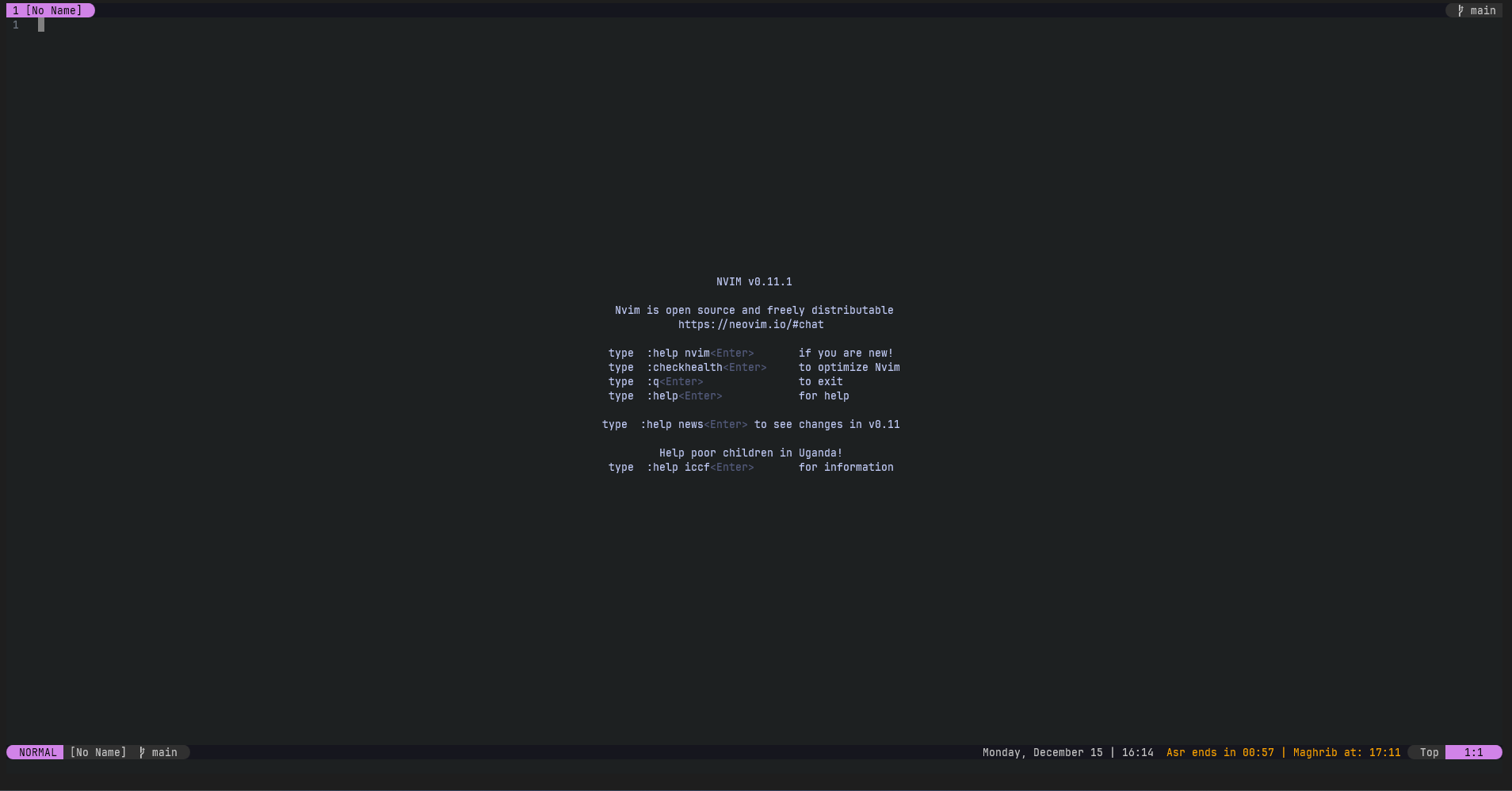
✨ Features
- complete offline calculation based on Equation of Time and Declination of Sun
- supports hanafi school of thought adjustments
- supported methods: MWL, ISNA, Egypt, Makkah, Karachi, Tehran, Jafari, France, Russia, Singapore.
- supports higher latitude adjustment
- lualine integration to display current waqt status
📦 Requriements
- Neovim >= 0.11
- plenary.nvim
- lualine (optional)
🚀 Installation
Install the plugin with your preferred package manager
{ "tajirhas9/muslim.nvim", dependencies = { "nvim-lua/plenary", -- OPTIONAL "nvim-lualine/lualine" }}⚙️ Configuration
muslim.nvim comes with the following defaults:
{ refresh = 1, -- Refresh interval in minutes to update prayer waqt times latitude = nil, -- MANDATORY TO BE PROVIDED. Geolocation latitude of the place of calculation longitude = nil, -- MANDATORY TO BE PROVIDED. Geolocation longitude of the place of calculation utc_offset = 0, -- timezone, default is GMT+0 school = 'hanafi', -- school of thought method = 'MWL', -- calculation method. default is Muslim World League}🛠️ Setup
local muslim = require("muslim")muslim.setup({ latitude = 23.816237996387994, longitude = 90.79664030627636, timezone = 'Asia/Dhaka', utc_offset = 6, refresh = 5})🧭 Commands
muslim.nvim supports the following user commands.
| Command | Description |
|---|---|
:PrayerTimes | Returns a table with the waqt timestamps for the day |
:PrayerTimes sample return value
{ asr = 1765791300000, dhuhr = 1765777680000, fajr = 1765753500000, isha = 1765801560000, maghrib = 1765797120000, midnight = 1765820880000, sunrise = 1765758240000, sunset = 1765797060000}🧩 Integration with lualine
If you want the prayer times to appear in the statusline, you have to update your lualine configuration to add the following to the section of the lualine you want the text to be.
{ muslim.prayer_time, id = "muslim.nvim" }🎨 Sample lualine configuration
To get something similar to the image above, the configuration can be as below:
require("lualine").setup({ sections = { lualine_a = { { 'mode', icons_enabled = true, separator = { left = '' }, right_padding = 2 } }, lualine_b = { { 'filename', path = 1 }, 'branch' }, lualine_c = { { clients_lsp } }, -- added muslim.nvim here lualine_x = { { 'datetime', style = 'default' }, { muslim.prayer_time, id = "muslim.nvim", color = { fg = colors.blue } } }, lualine_y = { 'filetype', 'progress' }, lualine_z = { { 'location', separator = { right = '' }, left_padding = 2 }, }, }})